
How to create a martech prioritization framework in Asana or Monday
Also: 4 things you need to know about context for AI agents

In this edition:
How to create a martech prioritization framework in Asana or Monday
4 things you need to know about context for AI agents
For Paid Subscribers: When the score ranks your CMO's favorite tool last
Your AI scoring is only as honest as your account data.
And duplicate accounts are lying to it.
Most dedupe tools pick the survivor by which record looks cleaner, then delete the engagement history that told you the account was in-market. Bad matches, split attribution, and AI models scoring off fiction all follow from that one choice.
On July 7, Traction Complete demos agentic scoring live: it reads what is actually inside each account before deciding what survives a merge.
How to create a martech prioritization framework in Asana or Monday
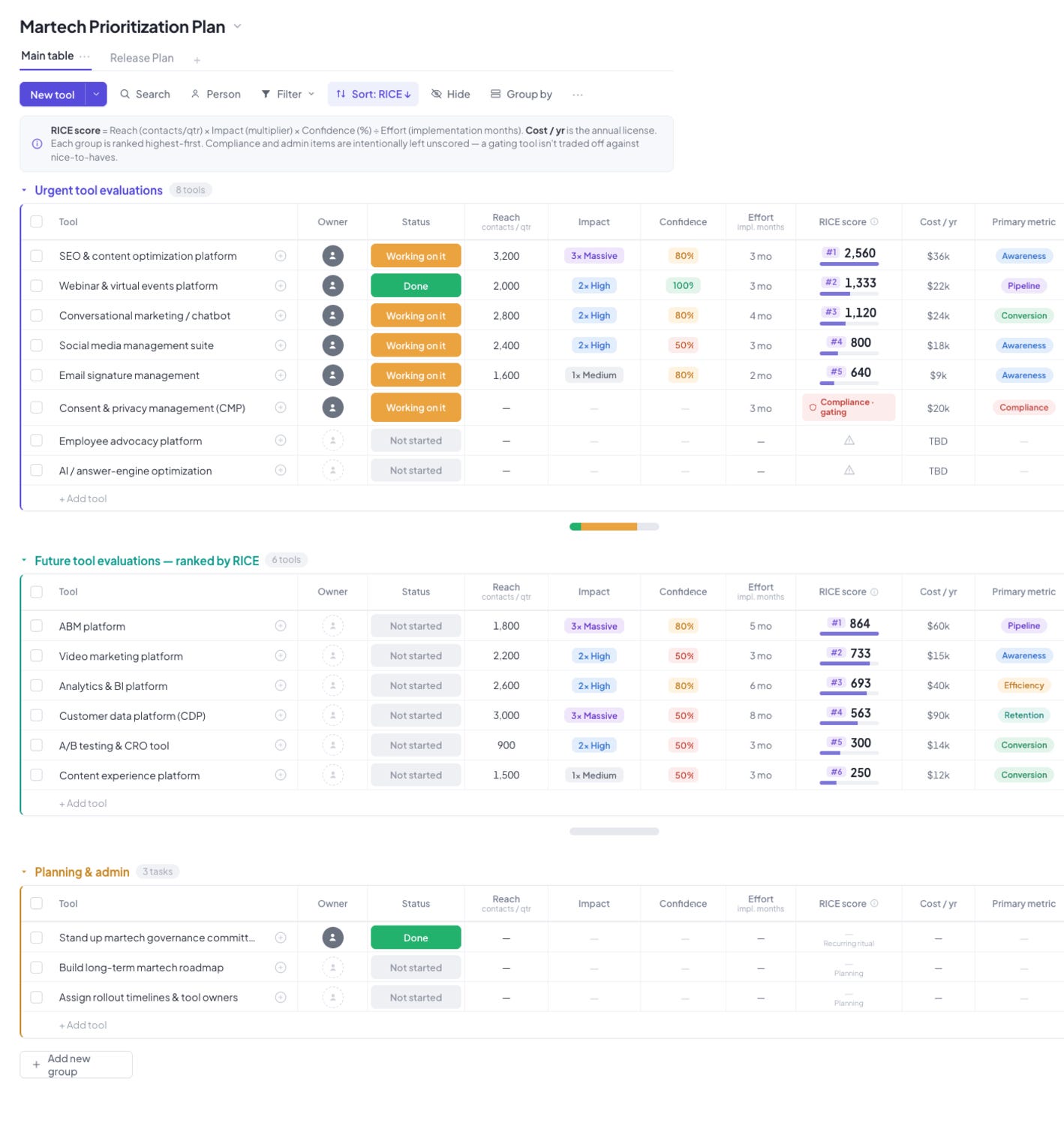
Most martech roadmaps are a wish list dressed up as a plan, funded in whatever order survives the loudest meeting. A prioritization framework fixes that by scoring every tool the same way and letting the ranking fall out of the numbers. Here is how to build one in the project tool your team already runs, using RICE.
RICE scores a tool on four inputs. Reach is contacts touched per quarter. Impact is a multiplier, using 3x for massive, 2x for high, 1x for medium. Confidence is the percent you would honestly bet on the outcome. Effort is implementation time in months. The score is Reach times Impact times Confidence, divided by Effort. Build the board so the tool runs that math for you.
1. Create one board with three groups
Build a single board called Martech Prioritization Plan. In Monday, add three groups; in Asana, three sections. Name them Urgent evaluations, Future evaluations, and Planning and admin. Those groups are your tiers, so every tool lives in exactly one and the ranking stays readable. Keep it to one board, not three, so nothing competes across separate lists.
2. Add the scoring columns
Add one column per input, as number columns in Monday or number custom fields in Asana:
Reach (number): contacts per quarter.
Impact (number): 3, 2, or 1. Store it as a number, not a label, so the formula can multiply it. Keep a separate status or dropdown for “Massive / High / Medium” if you want the words on screen.
Confidence (number): the percent, entered as 80, not “80%”.
Effort (number): implementation months.
Then add Owner (people or assignee), Status, Cost per year (number, currency), and Primary metric (a dropdown or status set to awareness, pipeline, conversion, retention, or efficiency). Cost stays in its own column so value and price sit side by side, and the primary metric forces every tool to name the job it was hired to do.
3. Add the RICE formula column
In Monday (Pro plan or higher), add a Formula column and enter:
({Reach} * {Impact} * {Confidence} / 100) / {Effort}
In Asana (Advanced plan or higher), add a Formula custom field and build the same arithmetic: Reach times Impact times Confidence, divided by 100, divided by Effort. You divide Confidence by 100 because you stored it as a whole number. Both tools calculate per row rather than across the board, which is exactly what you want here: one score per tool, updated the moment its four inputs are filled.
4. Sort each group by RICE, highest first
Sort within each group by the RICE column, descending. Now the top of every tier is the next tool to evaluate, and the order re-sorts itself whenever an input changes. This is the payoff. The ranking is maintained by the data, not renegotiated in a meeting.
5. Leave compliance and admin items unscored
Do not enter Reach, Impact, or Confidence for gating tools or planning tasks. A consent and privacy platform is a requirement, not a candidate, and scoring it against nice-to-haves would either rank it too low to fund or push you to inflate its numbers to protect it. Set its Status to “Compliance / gating” and leave the score blank. Do the same across the Planning and admin group, covering the governance committee, the roadmap, and the named tool owners. Those items run the plan; they do not compete inside it.
The board becomes the decision
That is the whole framework: four inputs, one formula, three tiers, sorted. Fill it in for every tool on your list, including the ones you already decided to buy, and let the board hand you the order. The next time someone asks why one tool ranks above another, the answer is already on the board, in numbers they helped set.
AI-Powered Campaign Creation: Ship 5-10X Faster with AI
Knak builds complete, on-brand emails and landing pages, ready to send, without waiting on designers or developers. It integrates directly with Marketo, Eloqua, HubSpot, and SFMC so marketers can launch in minutes instead of weeks.
If campaign creation is your bottleneck, this is worth a look.
4 things you need to know about context for AI agents
Phil’s latest episode is part two of the martech architecture series, and it explains why agents fail even on clean data. Four things worth taking from it.
1. A clean data warehouse is not enough to make an agent trustworthy
Feed an agent governed data with no shared meaning and you get what Jason Dobbs calls “believable nonsense”: output that looks polished and precise, and is wrong in ways that pass the first glance and land on a board slide before anyone asks how the number was built.
2. Data quality, context engineering, and the semantic layer are three different jobs
Most teams collapse them into one. Data quality keeps the agent from misrepresenting what the warehouse holds. Context engineering puts the right meaning and rules in front of the model at the moment it decides. The semantic layer encodes what your domain means: the concepts, relationships, and constraints dashboards never needed and agents cannot work without. Phil’s point is that the industry built the metrics version of this in 2012 and skipped the version agents actually require.
3. Context runs at two speeds, and rot lives in the gap
The slow layer (strategy, ICP, data definitions) is a documentation problem you can build in a sprint. The fast layer (routing changes, the decisions buried in Slack) is a decision-provenance problem most teams have not solved. Context rot sets in when the slow layer freezes while the business keeps moving, and the agent acts on assumptions the team abandoned months ago.
4. Ask the same question twice to catch a faking agent
The test comes from Istvan Meszaros. Ask your AI the same question twice. If the answer changes, it is generating a plausible response rather than reasoning from evidence. It takes thirty seconds, and you can run it before trusting any output in production.
